
FIND AND MANAGE DUPLICATE FILES SAFELY
Duplicate File Detective provides the tools you need to find and remove duplicate files residing on hard drives, removable storage devices, network attached storage, and more. Once found, you'll be able to safely move, zip, or remove them. You can even replace moved or deleted duplicate files with links to the original.
Our duplicate file finder technology does more than just free up disk space - it reduces the expense of time-consuming backup operations, brings clarity to document storage areas, speeds up file searches and indexing processes, reduces clutter, and improves accessibility for users.
FAR BEYOND DUPLICATE FILE REPORTING
-
File content analysis & optional byte-for-byte match confirmation
-
Find duplicate photos by visual content, even when resized or converted
-
Find duplicate documents by their embedded properties, not just contents
-
Find duplicate files on multiple local and network paths in a single pass
-
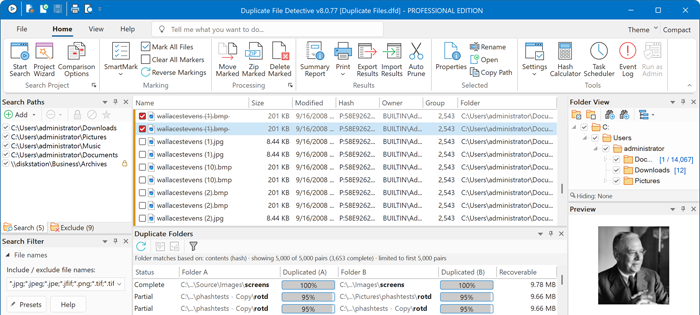
The duplicate folder report reveals whole folders copied elsewhere
-
Robust, built-in report scheduling with email delivery support
-
Clean up by moving, archiving, or deleting duplicate files
-
Replace moved or deleted duplicate files with links to the original
-
User-level reporting tells you who owns duplicate files
Under active development since 2005, Duplicate File Detective is a business-class duplicate finder with deep scalability,
robust duplicate file detection, and excellent performance.
Try it and see why so many users depend on Duplicate File Detective.
-
Use the built-in file hash calculator to compute checksums for any file
-
Report and visualize space used by duplicate file types
-
Export data to HTML, PDF, CSV, and MS Excel file formats
-
Select duplicates for processing with SmartMark technology
-
Advanced options for searching, filtering, and processing duplicates
-
Native 64-bit performance, fully Unicode enabled
WHAT IS A DUPLICATE FILE FINDER?
A duplicate file finder scans your storage for files with identical content so the redundant copies can be reviewed and removed. Duplicate File Detective is a duplicate file finder and remover for Windows that scans local drives, network shares, NAS devices, and removable storage — identifying true duplicates by file content with hash-based analysis and optional byte-for-byte verification, then helping you safely move, zip, delete, or replace duplicates with links to the original file. Version 8 extends matching beyond file contents: duplicate photos can be found by their visual appearance, duplicate documents by their embedded properties, and entire duplicated folders by the duplicate folder report.
Quick Facts
- Operating systems: Windows 11, 10, 8, 7 (SP1); Windows Server 2025, 2022, 2019, 2016, 2012 R2
- Duplicate detection: file content matching via CRC32, MD5, SHA-1, SHA-256, or SHA-512 hashing, with optional byte-for-byte confirmation
- Also matches: duplicate photos by visual appearance, documents by embedded properties, music by audio tags, and whole folders via the duplicate folder report
- Scan targets: multiple local and network paths (including NAS and file server shares) in a single pass
- Duplicate processing: move, zip, or delete duplicates — or replace them with links to the original
- Report exports: HTML, PDF, CSV, and Microsoft Excel
- Automation: built-in report scheduler with email delivery (Pro)
- Pricing: Personal Edition $30, Single-User Pro $60; multi-user, site-wide, and enterprise licenses available
- Free trial: fully functional 15-day evaluation — no feature limitations
- Publisher: Key Metric Software, LLC (est. 2003); Duplicate File Detective under active development since 2005
OVER 60,000 CLIENTS TRUST KEY METRIC SOFTWARE


















Windows Duplicate File Finder

Duplicate File Detective is built for the Windows operating system.
DownloadNews, Updates & Information
- What's New in Version 8
- Personal Edition Licenses are Now Available
- Guide: How to Find and Delete Duplicate Files in Windows 11
- Guide: Find and Remove Duplicate Photos on Windows
- Guide: Find Duplicate Files on Network Shares and File Servers
- Guide: Is It Safe to Delete Duplicate Files?
- Find & Replace Duplicates with Links to the Original
- More Products from Key Metric Software
Duplicate File Finder FAQ
What is a duplicate file finder?
A duplicate file finder is a software tool that scans storage devices for files with identical content, then helps you review and remove the redundant copies. Duplicate File Detective identifies true duplicates by analyzing file content — not just file names or sizes — so you can safely reclaim disk space, speed up backups, and reduce clutter on Windows PCs, servers, and network storage.
How does Duplicate File Detective identify duplicate files?
Duplicate File Detective compares files by their actual content using industry-standard hash algorithms (CRC32, MD5, SHA-1, SHA-256, and SHA-512), with optional byte-for-byte match confirmation for absolute certainty. File name, size, and date matching options are also available when you need them.
Can it find duplicate photos that are not identical files?
Yes. Duplicate File Detective 8 adds visual comparison, which derives a compact perceptual key from the decoded pixel content of each image rather than from its raw bytes. That key is stable across metadata edits, format conversion, recompression, and resizing, so copies of the same photo group together even when their files have nothing in common at the byte level. Visual comparison is deliberately conservative: it finds copies of the same picture, not pictures that merely resemble one another, so cropped, retouched, or watermarked images are treated as different pictures. Photos can also be matched on image metadata such as Date Taken, camera make and model, and pixel dimensions.
Can Duplicate File Detective find duplicate folders?
Yes. The duplicate folder report analyzes your search results and lists every pair of folders that share duplicate content, along with how much of each folder is duplicated in the other, the disk space you would recover by clearing either side, and a confidence rating of complete, partial, or incomplete based on actual scan coverage. Either side of a folder pair can be marked for processing with a single click.
Is it safe to delete duplicate files?
Deleting duplicates is safe when you use the right precautions. Duplicate File Detective is designed for safety: SmartMark technology helps you select the correct copies to process, duplicates can be moved or zipped instead of deleted, deletions can go to the Recycle Bin, and removed duplicates can even be replaced with links to the original file so applications keep working.
Can it find duplicate files on network drives and NAS devices?
Yes. Duplicate File Detective is network-enabled and can scan multiple local and network paths (including NAS devices and file server shares) in a single pass — a key advantage over consumer-grade duplicate file cleaners.
What versions of Windows does Duplicate File Detective support?
Duplicate File Detective runs on Windows 11, 10, 8, and 7 (SP1), plus Windows Server 2025, 2022, 2019, 2016, and 2012 R2.
Is there a free trial?
Yes. The free 15-day evaluation is fully functional with no feature limitations. Licenses start at $30 (Personal Edition) and $60 (Single-User Pro), with multi-user, site-wide, and enterprise licensing available.